II. Network Cabling
Cable is the medium through which information usually moves from
one network device to another. There are several types of cable which are
commonly used with LANs. In some cases, a network will utilize only one
type of cable, other networks will use a variety of cable types. The type of
cable chosen for a network is related to the network's topology, protocol,
and size. Understanding the characteristics of different types of cable and
how they relate to other aspects of a network is necessary for the
development of a successful network.
The following sections discuss the types of cables used in networks
and other related topics.
· Unshielded Twisted Pair (UTP) Cable
· Shielded Twisted Pair (STP) Cable
· Coaxial Cable
· Fiber Optic Cable
. Wireless LANs
· Cable Installation Guides
Unshielded Twisted Pair (UTP) Cable
Twisted pair cabling comes in two varieties: shielded and
unshielded. Unshielded twisted pair (UTP) is the most popular and is
generally the best option for school networks (See fig. 1).

The quality of UTP may vary from telephone-grade wire to
extremely high-speed cable. The cable has four pairs of wires inside the jacket. Each pair is twisted with a different number of twists per inch to help eliminate interference from adjacent pairs and other electrical devices. The tighter the twisting, the higher the supported transmission rate and the greater the cost per foot. The EIA/TIA (Electronic Industry Association/Telecommunication Industry Association) has established standards of UTP and rated five categories of wire.

Buy the best cable you can afford; most schools purchase Category
3 or Category 5. If you are designing a 10 Mbps Ethernet network and are considering the cost savings of buying Category 3 wire instead of
Category 5, remember that the Category 5 cable will provide more "room to grow" as transmission technologies increase. Both Category 3 and Category 5 UTP have a maximum segment length of 100 meters. In
Florida, Category 5 cable is required for retrofit grants. 10BaseT refers to
the specifications for unshielded twisted pair cable (Category 3, 4, or 5)
carrying Ethernet signals. Category 6 is relatively new and is used for
gigabit connections.
(A) Unshielded Twisted Pair Connector
The standard connector for unshielded twisted pair cabling is an
RJ-45 connector. This is a plastic connector that looks like a large
telephone-style connector (See fig. 2). A slot allows the RJ-45 to be
inserted only one way. RJ stands for Registered Jack, implying that the
connector follows a standard borrowed from the telephone industry. This standard designates which wire goes with each pin inside the connector.

Shielded Twisted Pair (STP) Cable
A disadvantage of UTP is that it may be susceptible to radio and electrical frequency interference. Shielded twisted pair (STP) is suitable for environments with electrical interference; however, the extra shielding can make the cables quite bulky. Shielded twisted pair is often used on
networks using Token Ring topology.
Coaxial Cable
Coaxial cabling has a single copper conductor at its center. A plastic layer provides insulation between the center conductor and a braided metal shield (See fig. 3). The metal shield helps to block any outside interference from fluorescent lights, motors, and other computers.

Although coaxial cabling is difficult to install, it is highly resistant to signal interference. In addition, it can support greater cable lengths between network devices than twisted pair cable. The two types of coaxial cabling are thick coaxial and thin coaxial.
Thin coaxial cable is also referred to as thinnet. 10Base2 refers to
the specifications for thin coaxial cable carrying Ethernet signals. The 2
refers to the approximate maximum segment length being 200 meters. In actual fact the maximum segment length is 185 meters. Thin coaxial cable is popular in school networks, especially linear bus networks.
Thick coaxial cable is also referred to as thicknet. 10Base5 refers to
the specifications for thick coaxial cable carrying Ethernet signals. The 5 refers to the maximum segment length being 500 meters. Thick coaxial cable has an extra protective plastic cover that helps keep moisture away from the center conductor. This makes thick coaxial a great choice when running longer lengths in a linear bus network. One disadvantage of thick coaxial is that it does not bend easily and is difficult to install.
(A) Coaxial Cable Connectors
The most common type of connector used with coaxial cables is the
Bayone-Neill-Concelman (BNC) connector (See fig. 4). Different types of
adapters are available for BNC connectors, including a T-connector, barrel connector, and terminator. Connectors on the cable are the weakest points in any network. To help avoid problems with your network, always use the BNC connectors that crimp, rather than screw, onto the cable.

Fiber Optic Cable
Fiber optic cabling consists of a center glass core surrounded by
several layers of protective materials (See fig. 5). It transmits light rather than electronic signals eliminating the problem of electrical interference.This makes it ideal for certain environments that contain a large amount of electrical interference. It has also made it the standard for connecting networks between buildings, due to its immunity to the effects of moisture and lighting.
Fiber optic cable has the ability to transmit signals over much
longer distances than coaxial and twisted pair. It also has the capability to carry information at vastly greater speeds. This capacity broadens communication possibilities to include services such as video conferencing and interactive services. The cost of fiber optic cabling is comparable to copper cabling; however, it is more difficult to install and modify. 10BaseF refers to the specifications for fiber optic cable carrying Ethernet signals.
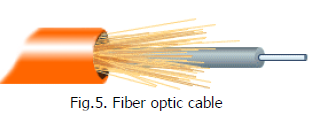
Facts about fiber optic cables:
· Outer insulating jacket is made of Teflon or PVC.
· Kevlar fiber helps to strengthen the cable and prevent
breakage.
· A plastic coating is used to cushion the fiber center.
· Center (core) is made of glass or plastic fibers.
(A) Fiber Optic Connector
The most common connector used with fiber optic cable is an ST connector. It is barrel shaped, similar to a BNC connector. A newer connector, the SC, is becoming more popular. It has a squared face and is easier to connect in a confined space.

Wireless LANs

Not all networks are connected with cabling; some networks are
wireless. Wireless LANs use high frequency radio signals, infrared light
beams, or lasers to communicate between the workstations and the file
server or hubs. Each workstation and file server on a wireless network has
some sort of transceiver/antenna to send and receive the data.
Information is relayed between transceivers as if they were physically
connected. For longer distance, wireless communications can also take
place through cellular telephone technology, microwave transmission, or
by satellite.
Wireless networks are great for allowing laptop computers or
remote computers to connect to the LAN. Wireless networks are also
beneficial in older buildings where it may be difficult or impossible to
install cables.
Wireless networking uses of Radio frequency (RF) technology or
infrared light beams to connect hosts in a network. The benefits of wireless
networking include increased mobility, simple and flexible installation, and easy
scalability. However, wireless networks also have some disadvantages they can
be very expensive, provide poor security, and are susceptible to electrical
interference from lights and radios.
Each host on a wireless network has some sort of transceiver / antenna to
send and receive the data. Information is relayed between transceiver as if they
were physically connected. For longer distance, wireless communications can
also take place through cellular telephone technology or by satellite.
There are two forms of wireless technology: frequency-hoping spread
spectrum (FHSS) technology and direct sequence spread spectrum (DSSS)
technology. FHSS uses a narrow band carrier that changes frequency in a
pattern known to both transmitter and receiver. Properly synchronized, the net
effect is to maintain a single logical channel. To an unintended receiver, FHSS
appears to be short-duration impulse. DSSS, on the other hand, generates a
redundant bit pattern for each bit to be transmitted. This bit pattern is called a
chip (or chipping code). The longer the chip, the greater the probability that the
original data can be recovered and, of course, more bandwidth required. Even if
one or more bits in the chip are damaged during transmission, statistical
techniques embedded in the radio can recover the original data without the need
for retransmission. To an unintended receiver, DSSS appears as low-power wide
band noise. It is rejected by most narrow band receivers.
There a two basic devises used in wireless networking, namely: access
points and station adapters. Access points connect the wireless network to the
wired network. Access points have routing capabilities and are programmed to
supply seamless roaming. Station adapters, on the other hand, connect PCs to
the access points via wireless communication.
There are so many considerations when one decides to implement a
wireless network. One of these is range. This refers to the maximum distance
from the access point of the station adapter before communication between the
two fails. The range is usually affected by interference such as microwaves and
other radio interference, as well as interference for structures such as walls and
doors. Another consideration is scalability. This refers to the ability of the
network to take in additional station adapters without degradation in
performance. Security is another consideration. It is well known that there are
many eavesdroppers who listen to wireless network traffic. Hence, most wireless
networks employ the use of encryption techniques to make it impossible for all
but the most sophisticated to gain unauthorized access to network traffic.
The two most common types of infrared communications used in schools
are line-of-sight and scattered broadcast. Line-of-sight communication means
that there must be an unblocked direct line between the workstation and the
transceiver. If a person walks within the line-of-sight while there is a
transmission, the information would need to be sent again. This kind of
obstruction can slow down the wireless network.
Scattered infrared communication is a broadcast of infrared transmissions
sent out in multiple directions that bounces off walls and ceilings until it
eventually hits the receiver. Networking communications with laser are virtually
the same as line-of-sight infrared networks.
Wireless LANs have several disadvantages. They provide poor security,
and are susceptible to interference from lights and electronic devices. They are
also slower than LANs using cabling.